iloader IPA Installer: A Simpler Way to Install SideStore and IPAs
If you’ve ever tried setting up SideStore or LiveContainer manually, you already know how messy it can get.
You deal with pairing files, certificates, Apple ID logins, random signing errors, and jumping between tools just to install a single app. It works… but it’s far from smooth.
That’s exactly the problem iLoader tries to solve.
What is iLoader?
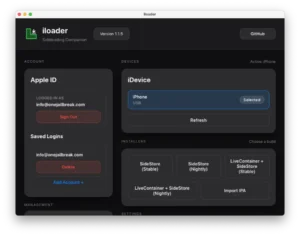
iLoader is a desktop tool built to make installing IPAs on iOS much easier. Instead of doing everything manually, it handles most of the setup behind the scenes.
Its main job is simple:
- Install SideStore
- Optionally install SideStore + LiveContainer together
- Let you install any IPA without rebuilding your workflow every time
Think of it as a “setup simplifier” rather than a completely new tool. It just connects all the annoying pieces into one clean process.
Why iloader actually matters
What makes iLoader useful isn’t innovation—it’s convenience.
Instead of:
- manually generating pairing files
- importing certificates
- fixing login issues
- retrying failed installs
iloader puts everything into one place and does it for you.
And it works the same across the following:
- Windows
- macOS
- Linux
No weird differences, no extra steps depending on your system.
What’s new in recent updates
The latest versions focus on polishing the experience rather than adding flashy features.
Key improvements include the following:
- clearer error messages (especially around the 3-app limit)
- better support for custom anisette servers
- pairing support for tools like StikStore and SparseBox
- fixes for input issues on macOS
Nothing revolutionary — just things that make the tool more reliable and less frustrating.
Installing SideStore the easy way
This is where iLoader really shines.
Instead of going through multiple steps manually, iLoader:
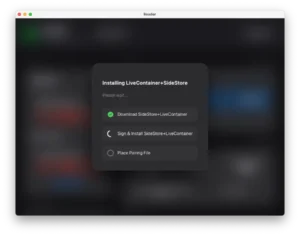
- installs SideStore in one guided flow
- places pairing files automatically
- imports certificates without user input
It removes most of the points where people usually get stuck.
Important note about LiveContainer
There is one limitation you need to know.
Right now, iLoader doesn’t properly handle keychain access for LiveContainer. If you install LiveContainer directly through iloader, different containers may end up sharing data (like Google accounts).
The safe way:
- Install SideStore using iLoader.
- Install LiveContainer from inside SideStore
This avoids the issue completely. A proper fix is expected in a future update.
More than just SideStore
Even after setup, iLoader is still useful.
You can use it as a general IPA installer to:
- install custom apps
- test builds
- install apps from trusted IPA libraries
So it’s not a one-time tool — it becomes part of your workflow.
Everyday features that actually help
iLoader also includes some practical tools that save time:
- Save multiple Apple IDs and switch easily
- View and revoke development certificates
- Inspect App IDs
- Manage pairing files for common apps
Everything stays in one place instead of scattered across scripts and folders.
Cross-platform without the headache
One of the best parts: it works everywhere.
- macOS → everything is included
- Windows → just install iTunes for drivers
- Linux → usbmuxd is usually already there or easy to install
No platform feels like a second-class experience.
Final thoughts
iLoader isn’t trying to replace SideStore or LiveContainer.
It just removes the friction of getting started—and honestly, that’s the part most people struggle with.
If you:
- install IPAs regularly
- help others set up SideStore
- or just want a smoother process
iLoader is a solid addition to your setup.
📥 Download iloader IPA Installer
Get the latest version of iLoader IPA Installer for your system. All downloads below are direct and ready to install.
🪟 Windows
👉 Download (EXE Installer)
iloader.exe
👉 Download (MSI Installer)
iloader.msi
- ⚙️ Requirements
- Windows 10 / 11 (64-bit)
- iTunes (Apple version, not Microsoft Store)
- Apple Mobile Device Support installed
- USB connection (first pairing required)
- Apple ID (free or developer)
🍎 macOS
👉 Download (DMG)
iloader.dmg
🐧 Linux
👉 Download (AppImage)
iloader.AppImage
👉 Download (Tar.gz)
iloader.tar.gz
⚙️ Requirements
- Linux (64-bit)
usbmuxdlibimobiledeviceideviceinstaller