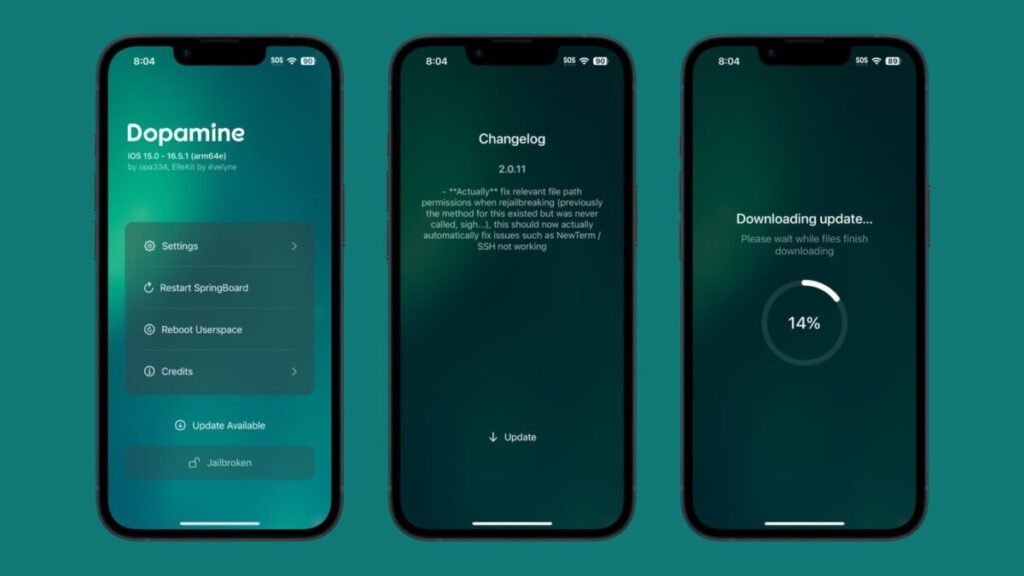
The Dopamine jailbreak is one of the most popular ways to jailbreak modern iPhones and iPads on iOS 15 and iOS 16. Built by developer Lars Fröder, known as opa334, it is a semi-untethered, rootless jailbreak for devices with an A12 chip or newer. Our original post covered a single small update, but this page is now a complete, evergreen guide: what Dopamine is, how its versions have improved, how to install it, how to re-jailbreak after a reboot, and how it compares with other popular tools.
What Is the Dopamine Jailbreak?
Dopamine is an open-source jailbreak developed by opa334, the same developer behind TrollStore. Its source code and official releases live on the Dopamine GitHub page. A few key terms help explain how it works:
- Semi-untethered: the jailbreak does not survive a full reboot. After restarting, you open the Dopamine app on the device and run it again. No computer is needed.
- Rootless: instead of modifying the protected system partition, Dopamine installs its files in a separate location. This is safer and makes it easy to remove the jailbreak cleanly.
- arm64e only: it targets devices with A12 Bionic or newer chips (iPhone XS, XR and later), and the matching M1/M2 iPads within the supported range.
Dopamine supports iOS 15 and much of iOS 16, but the exact range depends on your chip and the release you use. Always check the GitHub page for the current list of supported iOS versions and devices before you try anything.
Dopamine Version History in Brief
The Dopamine jailbreak has gone through two major generations:
- 1.x releases brought rootless jailbreaking to iOS 15 on A12 and newer devices and introduced the clean, one-button app design.
- 2.x releases were a large rewrite. They expanded support into iOS 16, added more exploit options, and improved overall reliability.
Within the 2.x line, many small point releases focused on stability. One example is version 2.0.11, which fixed path permission problems that could stop tools such as NewTerm (an on-device terminal) and SSH from working correctly. Other point updates addressed bootstrap issues, improved compatibility with tweaks, and fixed edge-case crashes. The lesson is simple: if something odd is happening, updating to the latest official release is often the first fix.
You can read the full changelog for every version on the releases section of the GitHub repository.
What You Need Before You Start
- An A12 or newer iPhone or iPad on an iOS version listed as supported on GitHub.
- TrollStore installed, which is the easiest way to install the Dopamine app permanently. If you do not have it yet, follow our guide on how to install TrollStore.
- A recent backup of your device in iCloud or on a computer.
- A good battery level and a stable Wi-Fi connection.
- Passcode and Face ID settings noted, since some guides recommend simplifying them during setup if you run into problems.
How to Install the Dopamine Jailbreak With TrollStore
This is a high-level overview. Always follow the official instructions in the GitHub README for your exact version.
- Confirm support. Check your iOS version in Settings > General > About and compare it with the supported range on the Dopamine GitHub page.
- Get the official release. Download Dopamine only from the releases section of the official GitHub repository. Do not use re-uploads from other sites.
- Open it in TrollStore. Share the downloaded file to TrollStore and tap Install. The Dopamine app will appear on your Home Screen.
- Open Dopamine and check the settings. You can choose your preferred package manager (such as Sileo or Zebra) and adjust a few options. The defaults are fine for most people.
- Tap Jailbreak. Keep the app open and wait. The process may take a few attempts, which is normal for exploits.
- Wait for the userspace reboot. Your device will respring or soft reboot when the jailbreak finishes.
- Open your package manager, refresh sources, and start installing rootless-compatible tweaks from trusted repos such as Havoc or Chariz.
How to Re-Jailbreak and Update Dopamine
Because the Dopamine jailbreak is semi-untethered, a full reboot or a dead battery puts your device back into a non-jailbroken state. Your tweaks are still installed, but they will not load until you run the jailbreak again.
- After a reboot, unlock your device and wait a few seconds.
- Open the Dopamine app from the Home Screen.
- Tap Jailbreak and wait for the respring.
To update to a newer version, download the latest release from GitHub and install it over the old one with TrollStore. Your jailbreak environment and tweaks normally stay in place. Read the release notes first, because some updates ask you to reboot or re-jailbreak after installing.
If you ever want to go back to stock, Dopamine includes an option to remove the jailbreak. Since it is rootless, this cleanly deletes the jailbreak files.
Troubleshooting Common Dopamine Issues
- The jailbreak fails or the device panics: reboot, wait a minute after unlocking, and try again. Exploits are not always successful on the first attempt.
- NewTerm or SSH does not work: update to the latest release, since permission bugs like the one fixed in 2.0.11 have been addressed in official updates.
- Tweaks do not load: make sure they are rootless-compatible. Older rootful tweaks will not work on a rootless jailbreak.
- Respring loop after installing a tweak: reboot to exit the jailbreak, re-jailbreak, and remove the last tweak you installed.
- Dopamine app is missing: reinstall it from the official GitHub release through TrollStore.
- Still stuck: check the issues section of the GitHub repository, where many common problems are already discussed.
Dopamine Jailbreak vs RootHide Bootstrap vs palera1n
The Dopamine jailbreak is not the only option. Which tool you should use depends on your chip, your iOS version, and whether you have a computer.
| Feature | Dopamine | RootHide Bootstrap | palera1n |
|---|---|---|---|
| Type | Semi-untethered rootless jailbreak | Jailbreak-like environment (no kernel exploit) | Semi-tethered jailbreak |
| Devices | A12 and newer (arm64e) | Devices that support TrollStore | A11 and older (checkm8 devices) |
| Needs a computer | No | No | Yes, to boot jailbroken |
| Install method | TrollStore or other methods listed on GitHub | TrollStore | Computer tool over USB |
| Tweak support | Rootless tweaks system-wide | Tweaks injected into apps; some limits | Rootless and rootful modes |
| Best for | Full jailbreak on supported iOS 15–16 devices | Users on versions without a full jailbreak | Older iPhones and iPads |
If your device or iOS version is outside the Dopamine range but TrollStore works, our guide on installing the RootHide Bootstrap shows an alternative path.
Is the Dopamine Jailbreak Safe?
The Dopamine jailbreak is open source, widely used, and maintained by a respected developer, which makes it one of the more trustworthy tools in the scene. The rootless design also lowers risk, since system files are not modified. That said, jailbreaking always carries some risk: exploits can cause crashes, some apps refuse to run on jailbroken devices, and bad tweaks can cause respring loops. Keep a backup, install only from official sources, and avoid repos that offer cracked tweaks.
Frequently Asked Questions
Which devices does the Dopamine jailbreak support?
Dopamine supports arm64e devices, meaning A12 chips and newer. The exact iOS range depends on your chip and version, so check the official GitHub page for the current list.
Do I need a computer to use Dopamine?
No. Once the app is installed, usually through TrollStore, you jailbreak and re-jailbreak directly on the device.
Why do I lose my jailbreak after restarting?
Dopamine is semi-untethered. A full reboot returns the device to stock until you open the app and tap Jailbreak again. Your tweaks stay installed.
Can I use rootful tweaks with Dopamine?
No. The Dopamine jailbreak is rootless, so tweaks must be updated for rootless jailbreaks. Most popular tweaks from major repos already support it.
What did Dopamine 2.0.11 fix?
It fixed path permission issues that could stop tools such as NewTerm and SSH from working properly. Later updates continued to improve stability.
Conclusion
The Dopamine jailbreak remains a top choice for A12 and newer devices on supported versions of iOS 15 and iOS 16. It is open source, rootless, and easy to run again after a reboot. Keep it updated from the official GitHub page, stick to trusted repos, and use RootHide Bootstrap or palera1n if your device falls outside its range.