Can you play GTA 6 on iPhone? Yes, but not the way most “download” sites claim. Grand Theft Auto VI launched on November 19, 2026 for PS5 and Xbox Series X|S only, and there is no iPhone or Android version. The real way to play GTA 6 on iPhone is to stream it from a console you own using Remote Play. This guide shows you exactly how to set it up with PS Remote Play or the Xbox app, which controller to use, how to get smooth gameplay, and how to avoid the fake “GTA 6 mobile” downloads that are everywhere right now.
Quick Answer: How to Play GTA 6 on iPhone
- Have a PS5? Use the free PS Remote Play app to stream GTA 6 from your PS5 to your iPhone.
- Have an Xbox Series X|S? Use the free Xbox app and its Remote Play feature to stream from your console.
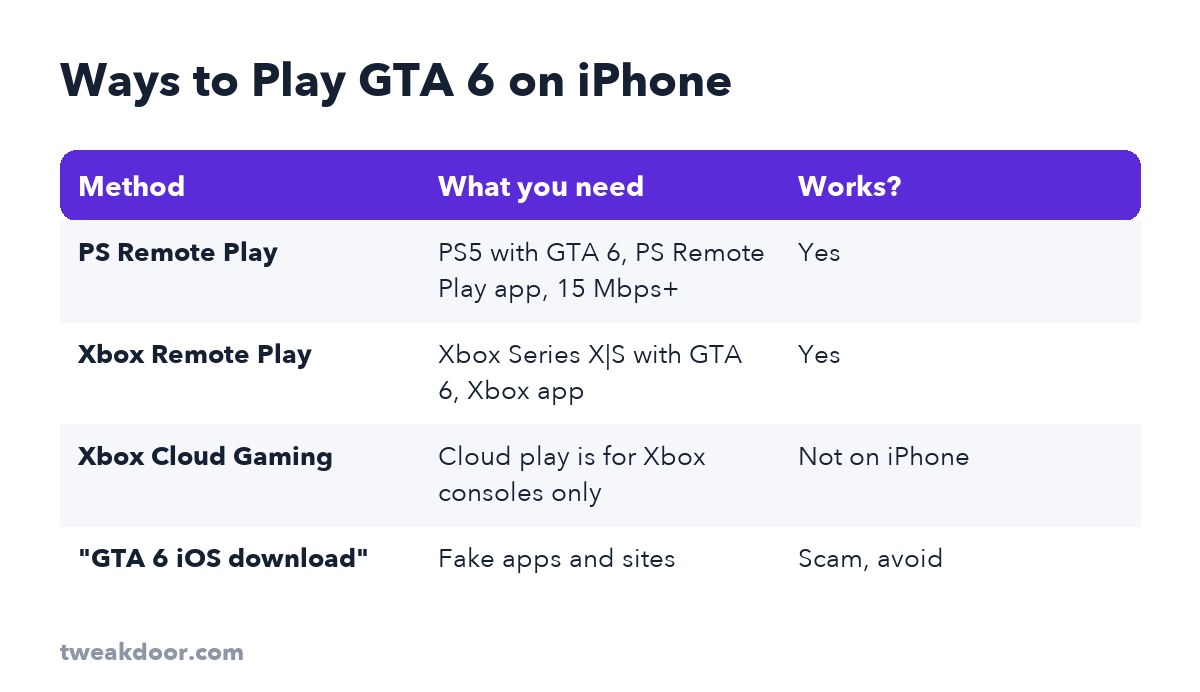
- No console? Right now there is no official way. Xbox Cloud Gaming supports GTA 6 only on Xbox consoles, not on phones.
- Saw a “GTA 6 iOS download”? It is fake. Do not install it.
Is There a GTA 6 iPhone App?
No. Rockstar released GTA 6 for PlayStation 5 and Xbox Series X|S, and it has not announced a version for iPhone, Android or even PC. That is why every legit method on this page uses streaming: the game runs on your console at home, and your iPhone shows the picture and sends your button presses back. Rockstar has said the game fully supports Remote Play on both PlayStation and Xbox, so this is an officially supported way to play.
Method 1: Play GTA 6 on iPhone With PS Remote Play
This is the best option for PS5 owners. PS Remote Play is a free app from PlayStation, and it works over Wi-Fi or mobile data.
What you need
- A PS5 with GTA 6 installed, signed in to your PlayStation account.
- An iPhone or iPad running iOS 16 or later.
- An internet connection of at least 5 Mbps. PlayStation recommends 15 Mbps or faster for a smooth picture.
- A controller (strongly recommended): DualSense, DualSense Edge, DualShock 4 or the Backbone One PlayStation Edition. On-screen touch controls work, but GTA 6 is much easier with real buttons.
How to set it up
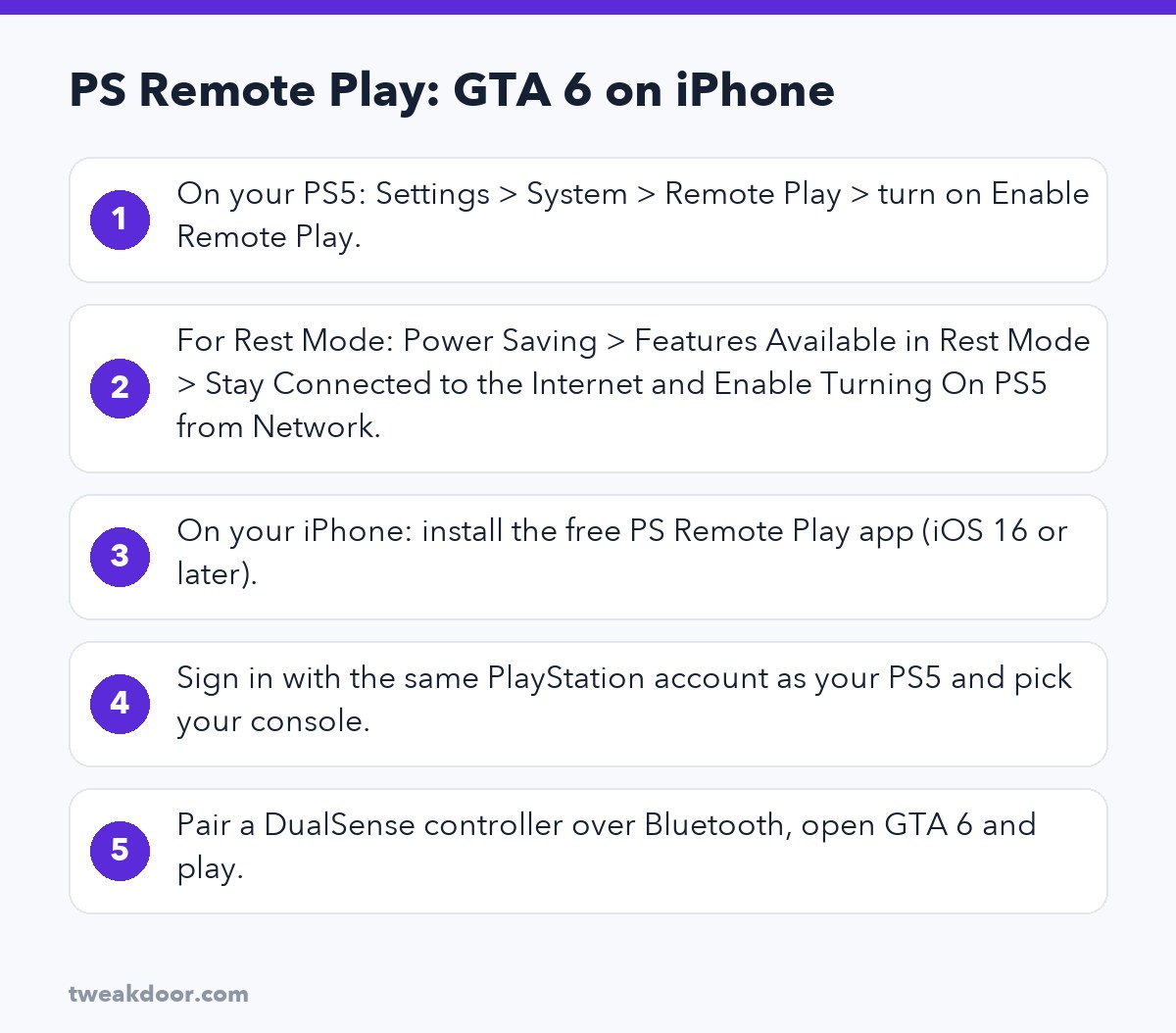
- On your PS5, go to Settings > System > Remote Play and turn on Enable Remote Play.
- To start your PS5 from your iPhone while it is in Rest Mode, open Settings > System > Power Saving > Features Available in Rest Mode and turn on Stay Connected to the Internet and Enable Turning On PS5 from Network.
- Install PS Remote Play on your iPhone and sign in with the same PlayStation account you use on your PS5.
- Choose PS5. The app finds your console and connects.
- Pair your controller in iPhone Settings > Bluetooth, then open GTA 6 from the PS5 home screen.
Method 2: Play GTA 6 on iPhone With Xbox Remote Play
If you own an Xbox Series X|S, the official Xbox app can stream your console to your iPhone. Note that you need a Series X|S at home: GTA 6 does not run natively on Xbox One, so an Xbox One cannot be used as the console you stream from.
What you need
- An Xbox Series X|S with GTA 6 installed.
- The Xbox app on an iPhone with iOS 15.1 or later, signed in to the same Microsoft account.
- A Bluetooth controller, such as the Xbox Wireless Controller.
- A fast connection: 5GHz Wi-Fi or a strong mobile signal. Xbox lists 10 to 20 Mbps, so faster is better.
How to set it up
- On your Xbox, open Settings > Devices & connections > Remote features and turn on remote features.
- Set the power mode so your console can wake up remotely (sleep or Instant-On).
- Open the Xbox app on your iPhone, tap the My Library or console icon, and choose Remote play on this device.
- Connect your controller over Bluetooth and launch GTA 6.
Why Xbox Cloud Gaming Will Not Work for GTA 6 on iPhone
Many players expect to open xbox.com/play in Safari and stream GTA 6. Unfortunately, that does not work for this game. GTA 6 is not part of Game Pass, so you must buy it, and its cloud streaming support was made for Xbox consoles, mainly so Xbox One owners can play. Reports from Windows Central and others say cloud play for GTA 6 is not available on phones, TVs or PC. Rockstar or Microsoft could change this in the future, and we will update this guide if they do.
Tips for Smooth GTA 6 Streaming on iPhone
- Connect your console with an Ethernet cable. This is the single biggest upgrade for stream quality.
- Use 5GHz Wi-Fi on your iPhone and sit close to your router.
- Close other apps and downloads that use your internet while you play.
- Lower the stream resolution in the app settings if the picture stutters.
- Use a controller. Driving and aiming in GTA 6 are far easier than with touch controls.
- Turn on Do Not Disturb so calls and notifications do not interrupt a mission.
Warning: Fake GTA 6 Mobile Downloads Are Everywhere
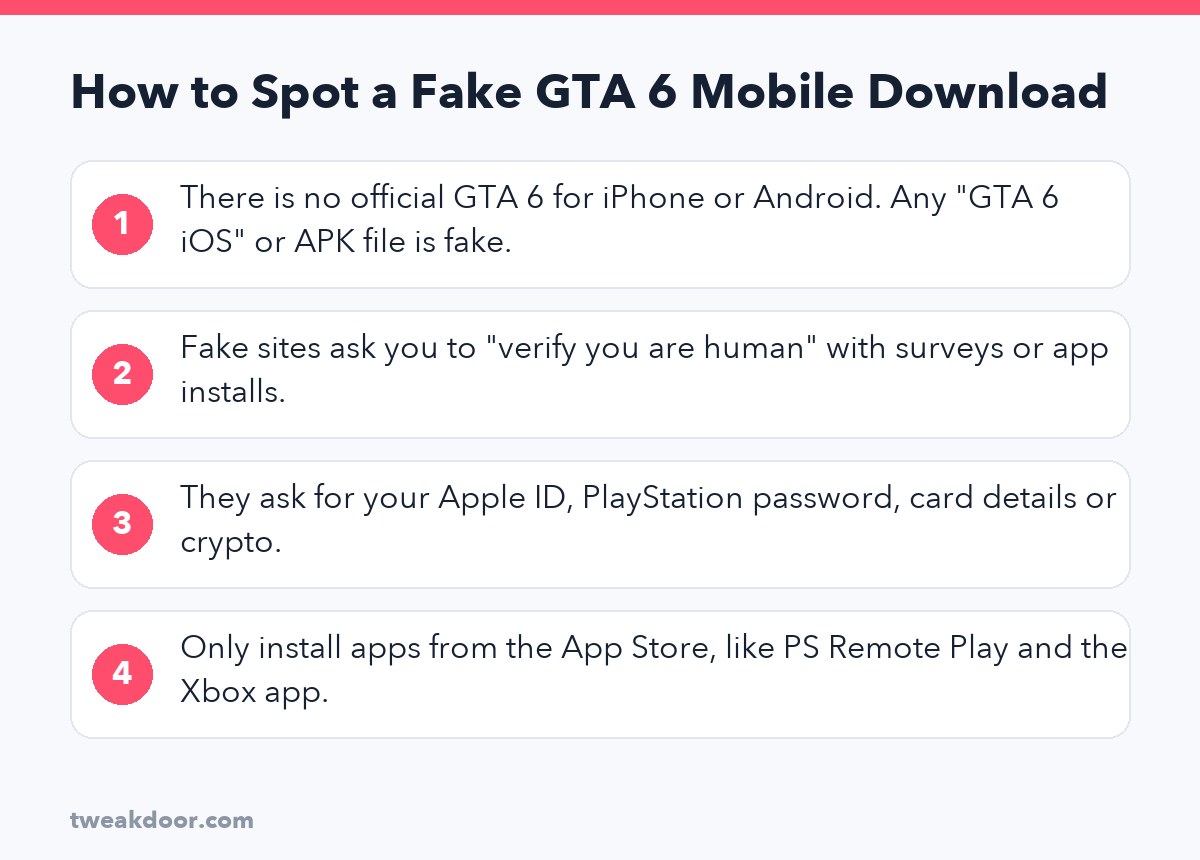
Security companies have warned about a wave of GTA 6 scams around the launch. Malwarebytes reported scams that try to steal accounts, money and crypto, and researchers found unauthorized GTA 6 apps on Google Play. Fake “GTA 6 for iPhone” sites usually ask you to complete surveys, install profiles or other apps, or type in your Apple ID, PlayStation password or card number. None of these are real. If a site promises a GTA 6 iOS or APK download, close it.
GTA 6 Launch Facts
| Detail | Info |
|---|---|
| Release date | November 19, 2026 |
| Platforms | PS5 and Xbox Series X|S (Xbox One through Xbox Cloud Gaming) |
| Price | $79.99 Standard, $99.99 Ultimate |
| Game Pass | Not included, you must buy it |
| First-day sales | $3.79 billion, the biggest entertainment launch ever according to Take-Two |
| iPhone or Android version | None announced |
For official details, see the Rockstar Newswire and the GTA VI page on Xbox.com. Looking for more free game rewards? Check our game codes and Roblox codes.
How to Play GTA 6 on iPhone: Frequently Asked Questions
Is GTA 6 free on iPhone?
No. You need to own GTA 6 on a PS5 or Xbox Series X|S. The streaming apps are free, but the game is not.
Can I play GTA 6 on iPhone without a console?
Not right now. Xbox Cloud Gaming supports GTA 6 only on Xbox consoles, and there is no native iPhone version.
Does PS Remote Play work on mobile data?
Yes. It works over Wi-Fi or mobile data, but you need a strong connection. PlayStation recommends 15 Mbps or faster, and streaming uses a lot of data, so watch your plan.
What is the best controller for GTA 6 on iPhone?
A PS5 DualSense works great with PS Remote Play, and an Xbox Wireless Controller works great with the Xbox app. Clip-on controllers like the Backbone One make it feel like a handheld console.
Will GTA 6 come to iPhone in the future?
Rockstar has not announced any mobile version. We will update this page if that changes. PC players can follow our GTA 6 PC release date guide.
Are there GTA 6 cheat codes?
Rockstar has not published an official list of GTA 6 cheats. Be careful with sites that claim to have them, especially ones that ask you to download files.