iOS 27.2.1 is the newest iPhone update, released on November 9, 2026. It sits on top of iOS 27.2, which arrived on October 26 with smarter Siri AI, new Messages actions, Photos upgrades and more than 160 security fixes. If you skipped iOS 27.2, installing iOS 27.2.1 gets you everything at once. Below is what is new, which iPhones get it, known issues, and our simple answer to the big question: should you update?
📱 Does your iPhone support iOS 27? Check in one tap with our free iOS 27 Compatibility Checker.
iOS 27.2.1 at a Glance
| Detail | Info |
|---|---|
| Latest version | iOS 27.2.1 (November 9, 2026) |
| What 27.2.1 adds | Bug fixes and security updates |
| Big feature update | iOS 27.2 (October 26, 2026) |
| Security fixes in 27.2 | More than 160 |
| Actively exploited bugs | None reported by Apple |
| Supported iPhones | iPhone 11 and later, iPhone SE (2nd generation and later) |
| Next update | iOS 27.3, now in beta |
What’s New in iOS 27.2.1
Apple describes iOS 27.2.1 simply as bug fixes and security updates. Its security notes list nine fixes, covering AirPlay and Bluetooth pairing, group chats in Messages and a compression library. None of them were marked as exploited. In short, iOS 27.2.1 is a small, safe maintenance update, and it also includes everything from iOS 27.2 if you have not installed that yet.
The Best New Features in iOS 27.2
Siri AI gets smarter
- Siri remembers past conversations, so you can pick up where you left off.
- More personal context: Siri can use photos sent in Messages, Calendar attendees, voicemails, and your Safari history and Reading List to answer better.
- New Excluded Apps setting: one place to choose which apps Siri, Search and suggestions are allowed to use.
- Copy part of an answer: select and copy just the piece of a Siri reply you need.
- New languages: French, Japanese, Korean, Portuguese and Spanish.
Siri AI works on the iPhone 15 Pro, iPhone 15 Pro Max and every iPhone 16 model and later. Apple says it is not available in the EU or mainland China.
Messages, Photos and more
- Messages suggestions: quick actions based on your chat, like adding a Calendar event or a reminder, with settings to control what shows up.
- Shared Albums: edit captions and comments, avoid duplicate photos and get a reminder before an album expires.
- AI image labels: SynthID watermarking helps identify images that were made or edited with AI in Photos and Image Playground.
- Podcasts: the Home tab is split into New Episodes and Continue Playing.
- Apple TV app: Simple Profiles give each person in your home their own watch history and recommendations.
- FaceTime: you can add a third-party sign language interpreter or live captioner to a call.
- Games app: the Friends tab shows why a friend is suggested and what they played recently.
Reporting from 9to5Mac also points to a refreshed Apple Music look, new smart lock options in the Home app, and Apple Pencil support for the USB-C iPhone Duo. New to the foldable? Read our iPhone Duo tips and tricks.
Which iPhones Get iOS 27.2.1?
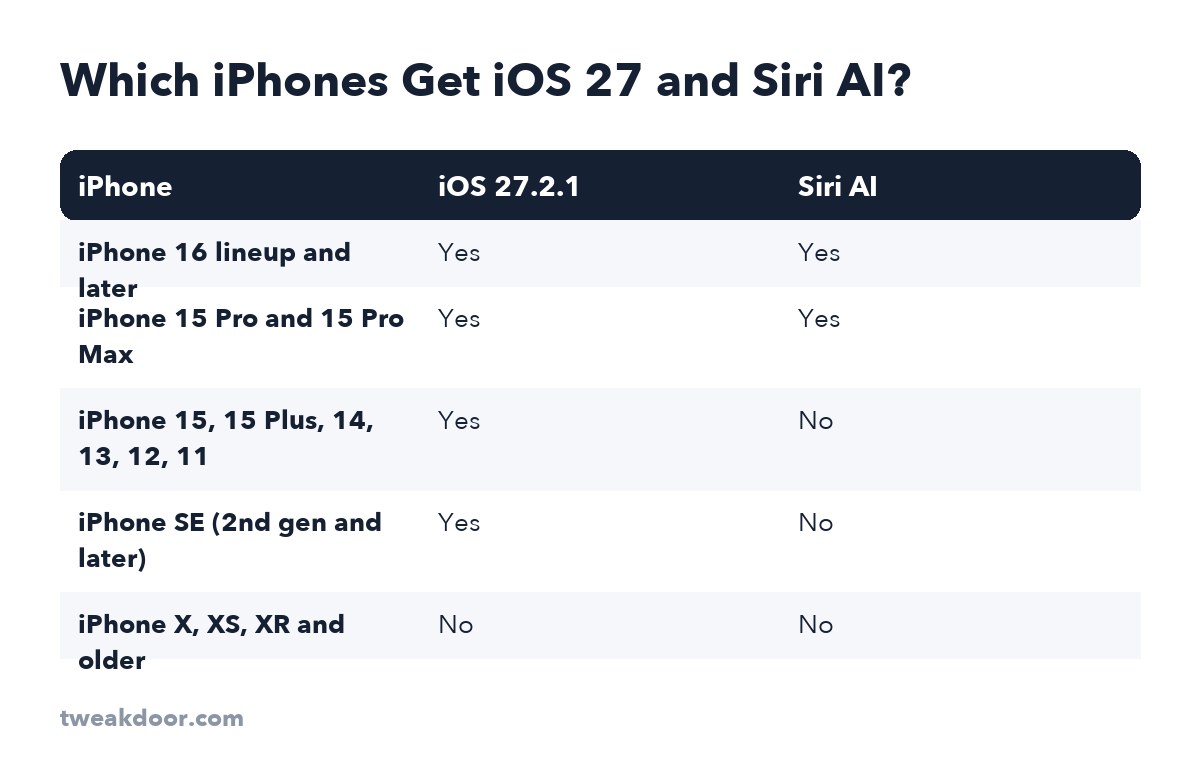
iOS 27 supports the same iPhones as iOS 26: iPhone 11 and later, plus iPhone SE (2nd generation and later). The iPhone X, XS and XR cannot install it. Apple is still releasing iOS 26 security updates for people who want to stay on iOS 26.
Security Fixes: Why This Update Matters
iOS 27.2 fixed more than 160 security vulnerabilities, according to Apple’s security notes and TechCrunch. They include WebKit bugs that could let a malicious website run code, kernel memory problems, and a storage bug that could give an app root access. Apple did not mark any of them as actively exploited, which means there is no emergency, but these fixes still make your iPhone noticeably safer, especially when you browse the web.
Known iOS 27.2 Problems
- Battery life: reports are mixed. Some people say battery got worse after updating, others say it improved. Apple has not confirmed a battery bug. Battery often drains faster for a day or two after an update while your iPhone re-indexes photos and data.
- Large download: the update can be big, often several gigabytes and in some reports over 20 GB depending on your model. Make sure you have free storage first.
- No widespread bugs: we found no reports from major Apple news sites of a serious problem affecting many users.
Should You Update to iOS 27.2.1?
Yes, for most people. iOS 27.2.1 is a small, stable update that includes all of iOS 27.2’s security fixes and new features. If you are already on iOS 27, there is little reason to wait. If you are still on iOS 26 and happy with it, you can stay there for now and install Apple’s iOS 26 security updates instead, then move to iOS 27 when you are ready.
How to Update to iOS 27.2.1
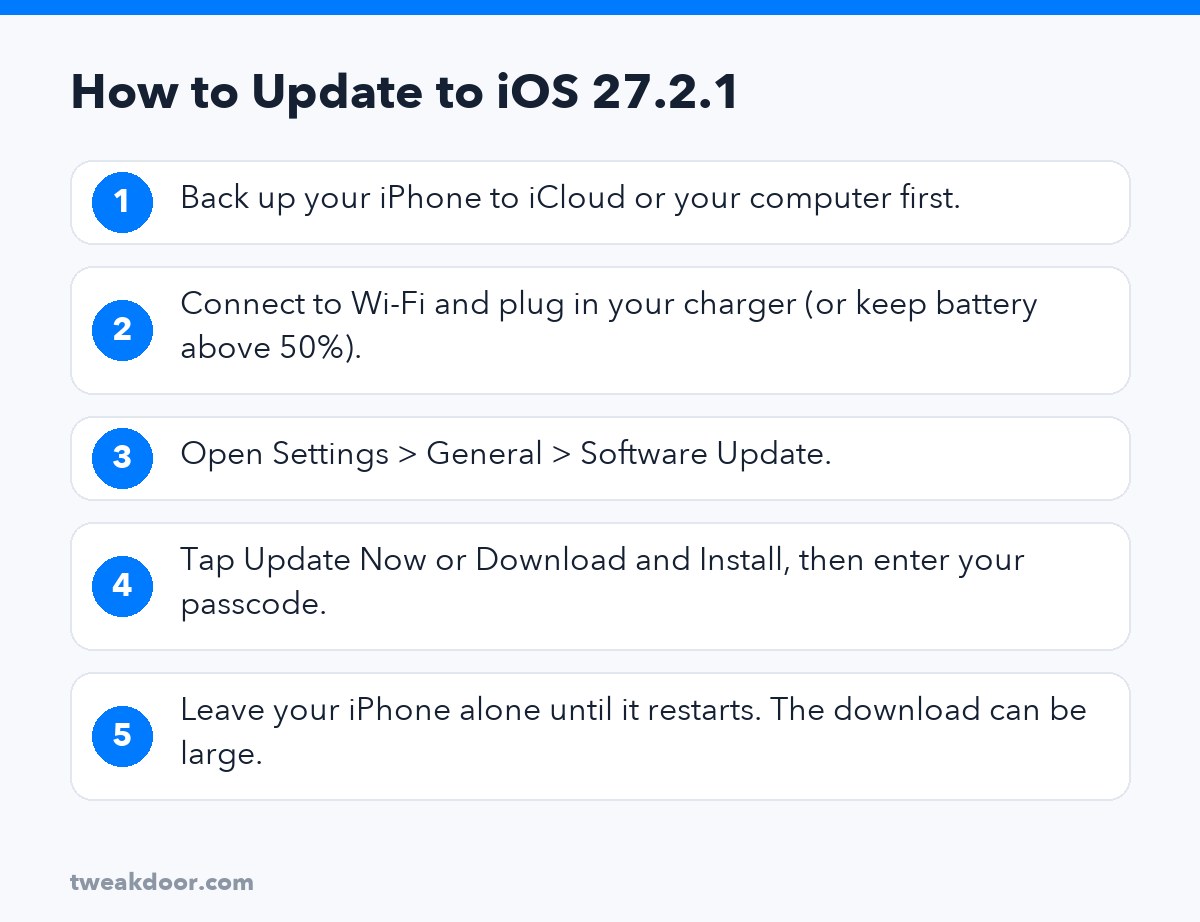
- Back up your iPhone to iCloud or your computer.
- Connect to Wi-Fi and plug in your charger.
- Go to Settings > General > Software Update.
- Tap Update Now or Download and Install.
- Enter your passcode and wait for your iPhone to restart.
What’s Coming in iOS 27.3
Apple is already testing iOS 27.3. The second beta, released on November 16, brings back the redesigned Health app that was pulled from iOS 27.2, adds more Siri AI abilities, and adds Face Unlock on iPhone Duo, according to MacRumors. Apple has not announced a release date, but updates like this often arrive in December or January. We will cover it as soon as it is out.
For Apple’s official notes, see Apple security releases. Want a fresh look for your updated iPhone? Try our free iPhone wallpapers.
iOS 27.2.1: Frequently Asked Questions
Is iOS 27.2.1 safe to install?
Yes. It is a small bug fix and security update, and there are no widespread problems reported.
Does iOS 27.2.1 drain the battery?
Some users report worse battery and others report better. Apple has not confirmed a battery problem, and short-term drain after an update is normal.
Why don’t I have Siri AI after updating?
Siri AI needs an iPhone 15 Pro, iPhone 15 Pro Max or iPhone 16 model or later, and it is not available in the EU or mainland China.
How big is the iOS 27.2.1 update?
Apple does not list one size. It depends on your iPhone and which version you are updating from, and it can be several gigabytes. Check the Software Update screen for your exact size.
When is iOS 27.3 coming out?
Apple has not announced a date. It is in beta now, and a public release is likely in the coming weeks.
Can my iPhone XR get iOS 27?
No. iOS 27 needs an iPhone 11 or newer, or an iPhone SE (2nd generation or later).