Just got Apple’s first foldable? These iPhone Duo tips and tricks will help you get far more out of it in the first week. The iPhone Duo works differently from every iPhone before it: it has two screens, new poses, Split View multitasking and a few settings you can only choose once. Below you will find the most useful features, the hidden settings worth changing, the right wallpaper sizes, and the mistakes that can cost you money on repairs.
iPhone Duo Basics in 30 Seconds
| Feature | iPhone Duo |
|---|---|
| Screens | 7.6-inch inner foldable display and 5.4-inch outer display |
| Chip | A20 Pro |
| Unlock | Touch ID in the side button (no Face ID) |
| Software | iOS 27 |
| Weight | 254 grams (8.96 oz) |
| Thickness | 5.2 mm open, 11.3 mm closed |
| US price | From $1,999 (256GB) |
1. Learn the Four iPhone Duo Poses
Apple designed the iPhone Duo to stand up in different shapes, called poses. Each one is useful for something different:
- Book: partly folded with the inner display in landscape. Great for StandBy on your nightstand and for group photos with Smart Take.
- Tent: the outer display faces out in landscape, so you can watch videos without holding the phone.
- Seated: like a tiny laptop, with the inner display in portrait. Perfect for hands-free FaceTime calls.
- Open and Closed: the normal ways to use it as a big screen or a regular phone.
The phone rotates and switches screens on its own when you fold, flip or open it, so try each pose once to see how it reacts.
2. Use Split View to Run Two Apps at Once
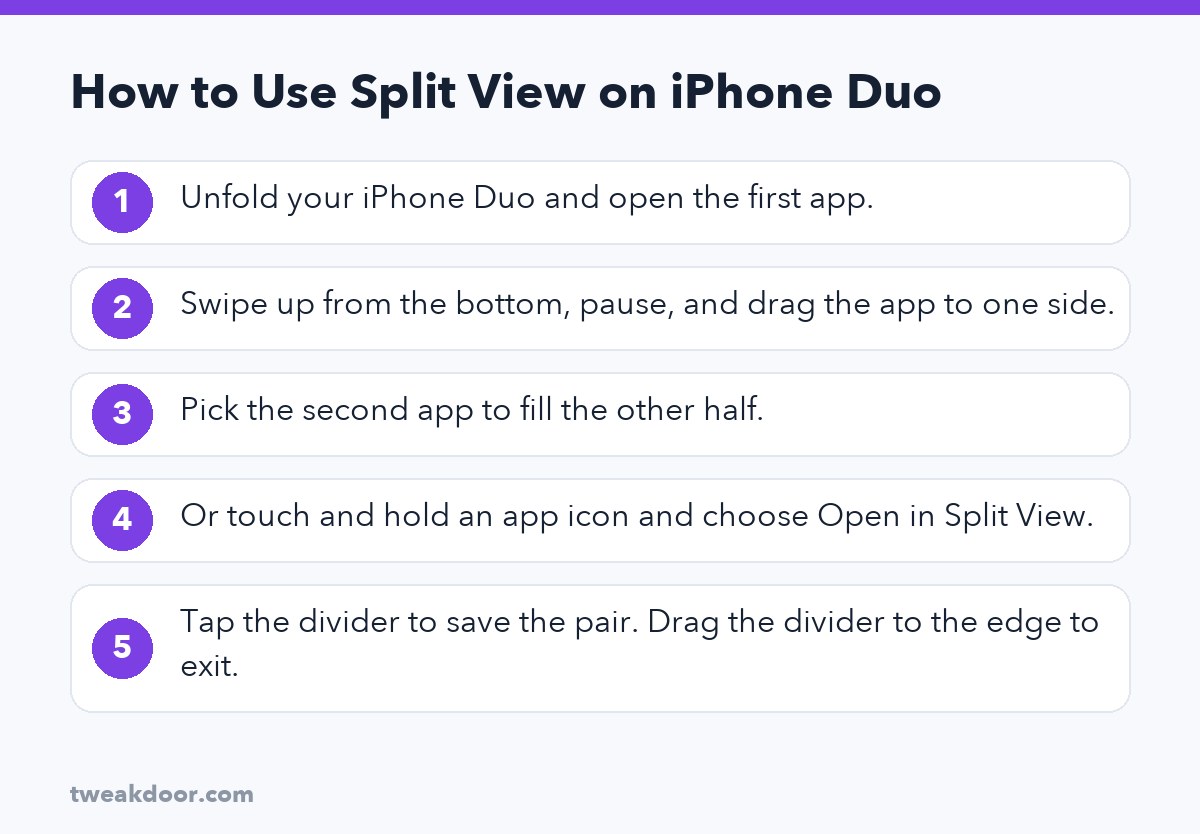
Split View is a first for iPhone. You can open two apps side by side, two windows of the same app, or save a favorite pair to open together later. A few things to know: the split is always 50/50 and cannot be resized, and only one app can play audio at a time.
3. Save Your Favorite App Pairs
If you always use the same two apps together, such as Messages and Safari or Notes and Mail, tap the divider in Split View to save the pair. Next time you can open both with one tap instead of setting them up again.
4. Set the Right Wallpaper Sizes for Both Screens
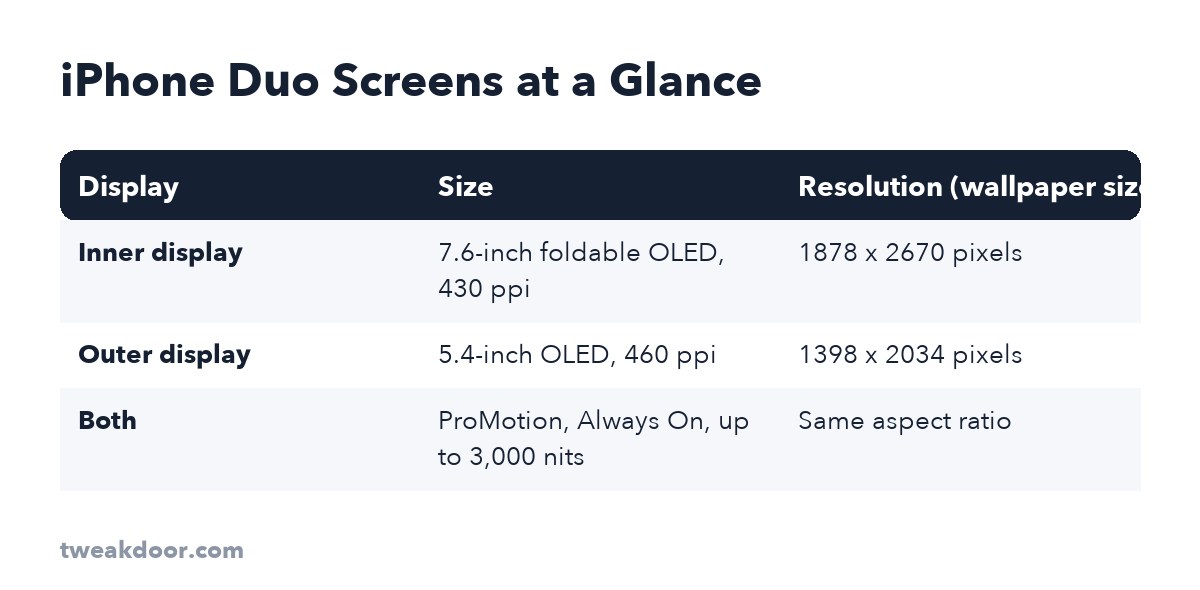
For a sharp wallpaper with no cropping, use these sizes:
- Inner display: 1878 x 2670 pixels
- Outer display: 1398 x 2034 pixels
Apple says both screens share the same aspect ratio, so one tall image works on both. Keep the top of the image simple so the clock stays easy to read. Need ideas? Browse our free iPhone wallpapers collection with more than 4,400 images.
5. Choose Display Zoom During Setup
This one catches a lot of new owners. MacRumors reported that the Display Zoom option, which makes text and icons larger, can only be picked during the first setup on iPhone Duo and is missing from Settings later. If you want bigger text and icons, choose it when you set up the phone. If you already finished setup, you can still raise the text size in Settings > Display & Brightness > Text Size.
6. Turn On Shift Left Edge If You Use Apple’s Case
If you use Apple’s iPhone Duo Case, go to Settings > Display & Brightness and turn on Shift Left Edge, as Apple’s support page recommends. It adjusts the screen to fit the case better.
7. Never Peel Off the Inner Screen’s Cover Layer
The inner display has a special polymer cover layer that protects the folding glass. It may look like a screen protector, but it is part of the phone. Do not peel it off and do not stick a normal screen protector on top of it. Apple says the cover layer can be replaced by Apple and authorized service, and with AppleCare+ the reported price is just $19. If you want a screen protector, use one made for the outer display only.
8. Get AppleCare+ (Repairs Are Expensive)
Foldable repairs cost a lot. According to MacRumors, an inner display repair without AppleCare+ is $999, compared with $99 with AppleCare+. AppleCare+ for iPhone Duo is reported at $19.99 per month or $199.99 per year.
| Repair | With AppleCare+ | Without AppleCare+ |
|---|---|---|
| Inner display | $99 | $999 |
| Outer display | $29 | $379 |
| Back glass | $29 | $199 |
| Inner cover layer | $19 | Not listed |
9. Try the Foldable Camera Tricks
- Selfies with the rear camera: use the outer display as a preview so you can take selfies with the better main camera.
- Duo Preview: shows the person you are photographing a live preview on the outer screen.
- Smart Take: fold the phone into Book pose for easy hands-free group shots.
10. Use StandBy on Either Screen
StandBy turns your iPhone Duo into a clock and widget display. On the Duo it works on either screen and even when the phone is not charging, so the Book pose on a desk makes a great little dashboard.
11. Fix Apps With Black Bars
Some apps show empty space around them on the big inner screen. This happens because the app has not been updated for the iPhone Duo yet. Apple’s developer guide explains that apps built with older tools run at a “familiar” iPhone size, while apps updated for iOS 27.1 fill the screen edge to edge. There is nothing wrong with your phone. Keep your apps updated in the App Store, and most popular apps will fill the screen as developers release updates.
12. Rely on Touch ID, Not Face ID
The iPhone Duo uses Touch ID in the side button instead of Face ID. Add more than one finger in Settings > Touch ID & Passcode, such as both thumbs and an index finger, so you can unlock it easily whether it is open or closed.
Where to Buy the iPhone Duo
The iPhone Duo starts at $1,999 for 256GB, with 512GB, 1TB and 2TB options, in Star White and Night Sky. You can buy it on Apple’s online store, where carrier trade-in deals are also listed, and see the full details on the iPhone Duo specs page.
iPhone Duo Tips: Frequently Asked Questions
Does the iPhone Duo have Face ID?
No. It uses Touch ID built into the side button.
Can I resize Split View on iPhone Duo?
No. Split View on iPhone Duo is always a 50/50 split.
What wallpaper size should I use for iPhone Duo?
Use 1878 x 2670 pixels for the inner display and 1398 x 2034 pixels for the outer display.
Should I put a screen protector on the inner display?
No. The inner display already has a replaceable cover layer. Do not remove it or cover it with a regular protector.
Why do some apps look small on the iPhone Duo?
Those apps have not been updated for the foldable yet. As developers update them for iOS 27.1, they will fill the whole screen.
Is the iPhone Duo crease noticeable?
Reviewers say it has the least visible crease of any foldable so far, but you can still see it in some lighting.