iOS 27.3 is Apple’s next big iPhone update, and it is packed: the redesigned Health app finally arrives, Siri AI learns to take actions inside your apps, and the iPhone Duo gets a new Face Unlock option. Apple has released two developer betas and a public beta so far. Here is everything new in iOS 27.3, when it should come out, and how to try it early if you cannot wait.
📱 Does your iPhone support iOS 27? Check in one tap with our free iOS 27 Compatibility Checker.
iOS 27.3 Release Date
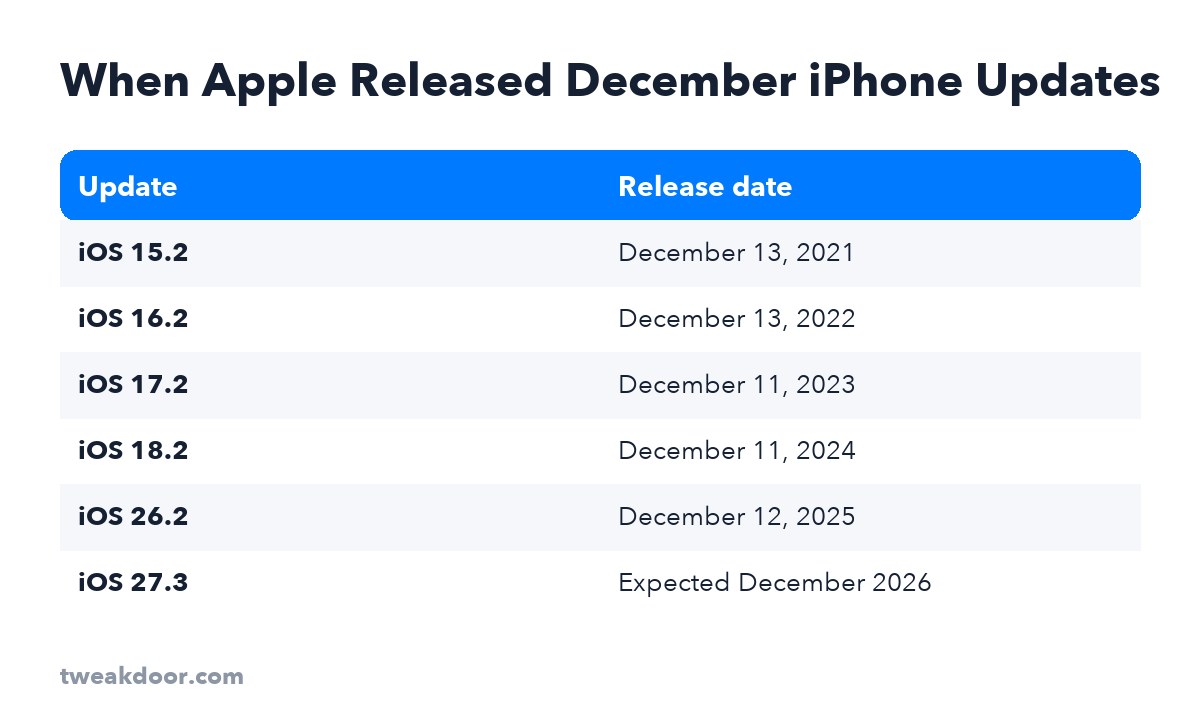
Apple has not announced a date, but iOS 27.3 is expected in December 2026. MacRumors expects December, and 9to5Mac points to the first half of the month. Apple’s big December updates have landed in a tight window for years:
| Update | Release date |
|---|---|
| iOS 15.2 | December 13, 2021 |
| iOS 16.2 | December 13, 2022 |
| iOS 17.2 | December 11, 2023 |
| iOS 18.2 | December 11, 2024 |
| iOS 26.2 | December 12, 2025 |
Because iOS 27.1 shipped only for the iPhone Duo, iOS 27.3 takes the usual December slot this year. Based on the pattern, a release around December 8 to 15 looks likely, but that is our estimate, not Apple’s.
iOS 27.3 Beta Timeline
- Beta 1: November 3, 2026 (developers)
- Public beta 1: November 5, 2026
- Beta 2: November 16, 2026 (developers)
The Best New Features in iOS 27.3
1. A redesigned Health app
The new Health app was tested in iOS 27.2 betas, pulled before release, and is back in iOS 27.3. It adds new Insights and Longevity tabs, personal guidance powered by Apple Intelligence, an assessment across seven health categories and a new Health Age feature.
2. Siri AI can act inside your apps
Siri AI can now take actions in Apple apps like Calendar, Messages, Mail, Photos, Safari, Files, Music, Journal and Shortcuts. Examples include unsubscribing from mailing lists, managing Safari tabs and organizing files. Siri can also read a full webpage with “Ask About Page,” use your Health data if you allow it, and control smart home devices better. New languages include Traditional Chinese, Vietnamese, Turkish and Norwegian.
3. Face Unlock for iPhone Duo
iPhone Duo owners get a new way to unlock. Turn on Unlock with Front Camera in Settings > Touch ID & Passcode. It works only when the phone is closed, using the camera on the outer screen. It is not Face ID: it only unlocks the phone, while Apple Pay, passwords and app sign-ins still need Touch ID or your passcode, and it turns off after 45 minutes without an unlock. A new Lock when closed option is also added. New to the foldable? See our iPhone Duo tips and tricks.
4. Safari upgrades
Safari gains vertical tabs, an adaptive dark mode for websites that do not have one, and a Global Privacy Control option.
5. StandBy for every iPhone on iOS 27
StandBy comes to all iPhones that run iOS 27, with new swipeable faces.
More changes
- A redesigned Weather app.
- Calendar controls move to the bottom of the screen.
- Control Center’s VPN toggle can switch between VPNs.
- Apple Music adds a “Selfie Sing” karaoke video feature.
- Apple Intelligence gets daily usage limits, with higher limits on iCloud+ plans of 200GB or more.
- The Home app adds an Unrecognized People section.
- Apple Watch Live Rewind and Siri Recap, with watchOS 27.3.
Which iPhones Will Get iOS 27.3?
Every iPhone that runs iOS 27 should get iOS 27.3: iPhone 11 and later, plus iPhone SE (2nd generation and later). Siri AI features need an iPhone 15 Pro or newer. For the full list, see our guide to iOS 27.2.1.
How to Try iOS 27.3 Early
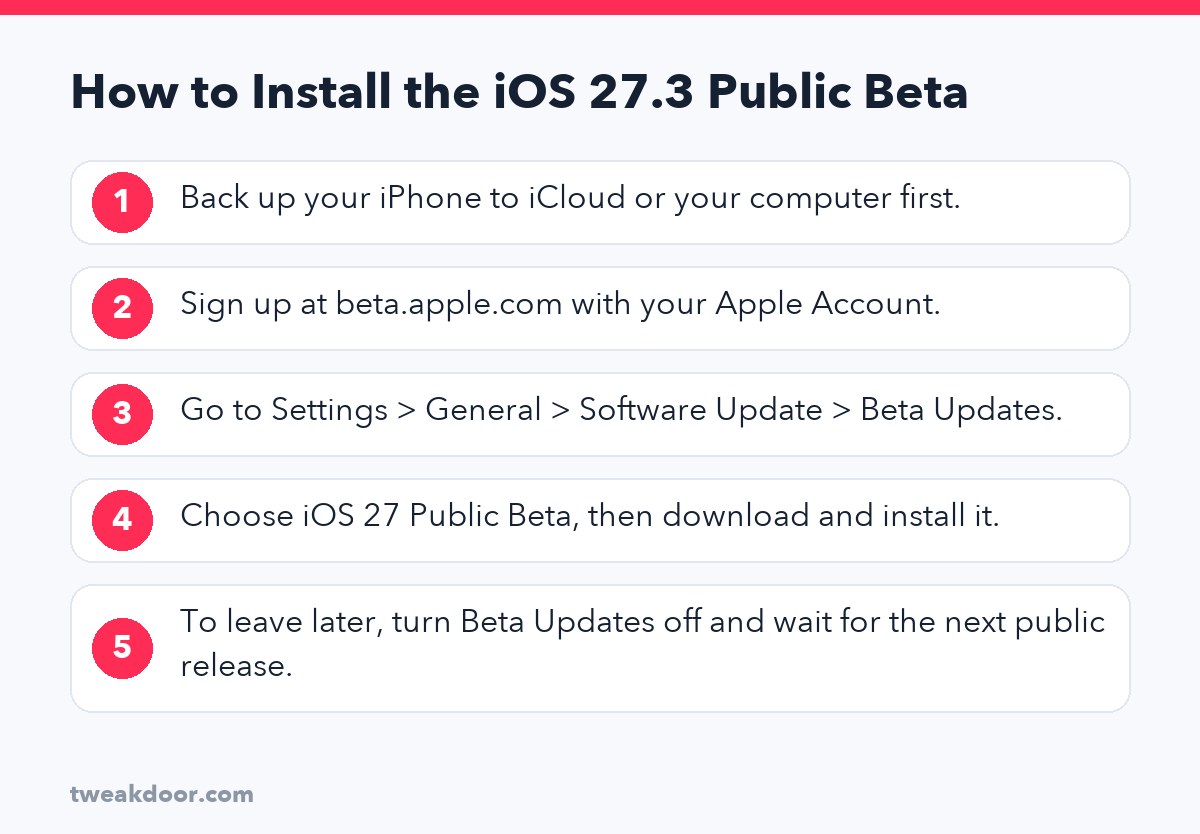
You can install the free public beta now, but Apple warns that betas can have bugs. Apple recommends backing up first and not using your main or business-critical device. Also note that the only way back to the stable version is restoring from the backup you made before installing the beta, and Apple Watch and AirPods cannot be downgraded after a beta.
- Back up your iPhone.
- Sign up at beta.apple.com.
- Open Settings > General > Software Update > Beta Updates and choose the iOS 27 Public Beta.
- Download and install the update.
Our advice: most people should wait for the public release in December. It is only a few weeks away and will be more stable.
iOS 27.3: Frequently Asked Questions
When will iOS 27.3 be released?
Apple has not announced a date, but reports expect December 2026, likely the first half of the month.
Is the new Health app in iOS 27.3?
Yes. The redesigned Health app with Insights, Longevity and Health Age is in the iOS 27.3 betas, and 9to5Mac reports it will ship with this update.
Is Face Unlock on iPhone Duo the same as Face ID?
No. It only unlocks the phone when it is closed. Payments and passwords still need Touch ID or your passcode.
Is the iOS 27.3 beta safe?
It is generally usable, but betas can have bugs. Back up first and avoid installing it on a phone you depend on for work.
Should I update to iOS 27.2.1 now or wait for 27.3?
Update to iOS 27.2.1 now for its security fixes. You can install iOS 27.3 when it arrives in December.