You do not need to pay for every streaming service to watch great movies and TV. These are the best free streaming apps on iPhone in 2026, all legal, all on the App Store, and most need no account at all. Some show ads, and a few are completely ad-free if you have a library card. We checked each one for what is free, whether you need to sign up, and what has changed recently, because several popular free apps have shut down.
Best Free Streaming Apps at a Glance
1. Tubi
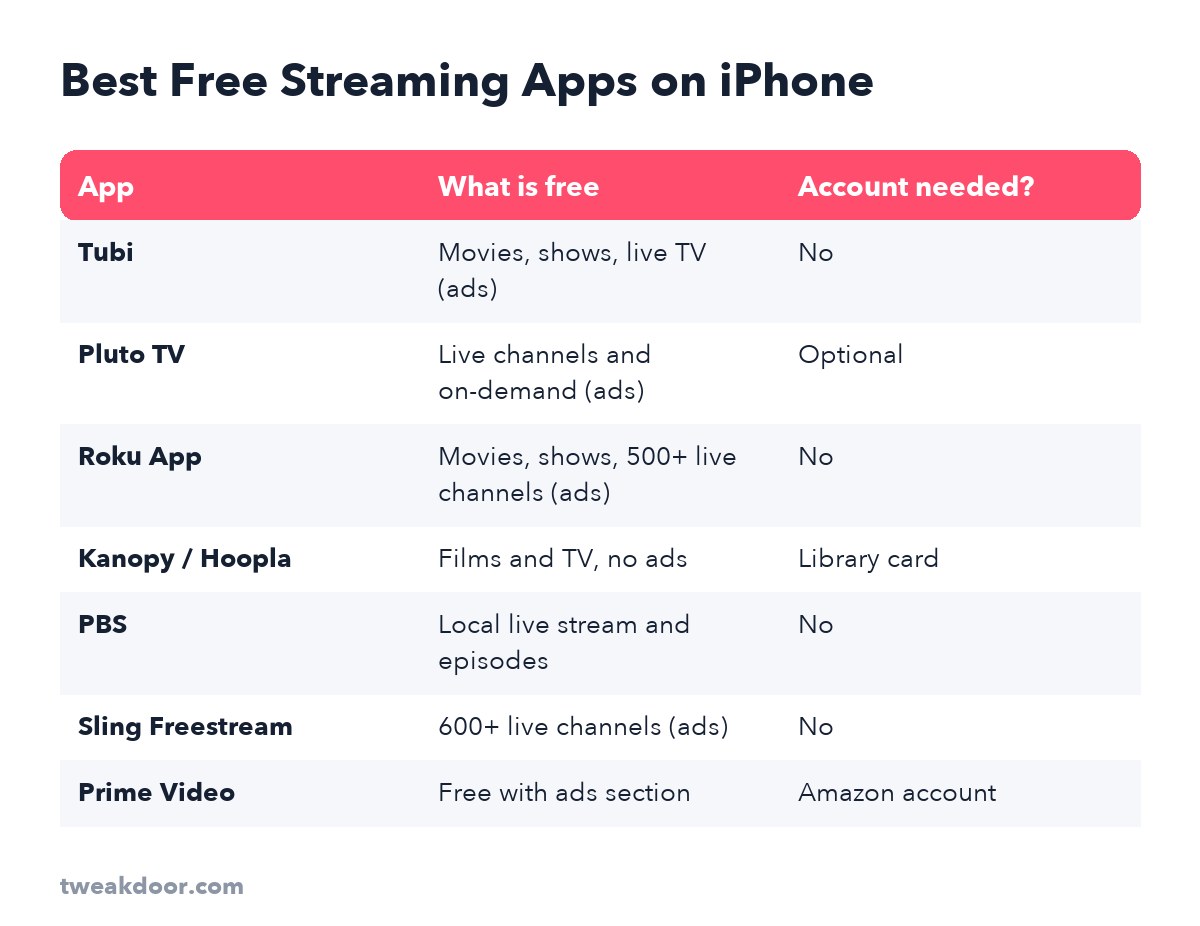
Tubi offers free movies, series and live TV with ads. Its listing calls it completely fee-free, and Tubi says new users can watch as a guest without making an account. It has one of the biggest free libraries, so it is a great first app to try. Fun fact: FOX streamed this year’s Thanksgiving Cowboys game free on Tubi. See our Thanksgiving NFL guide.
2. Pluto TV
Pluto TV has hundreds of live channels plus on-demand movies and shows, all free with ads. An account is optional, but without one some channels may be locked. It needs iOS 18 or later.
3. Roku App (Official)
New in November 2026, the official Roku App streams free ad-supported movies, shows and more than 500 live channels. Roku says you do not need an account, a subscription, a credit card or a Roku device. It is US only for now. Note that the older Roku Remote app is a separate app.
4. Kanopy and Hoopla (Ad-Free With a Library Card)
If you have a public library card, these two are hidden gems. Kanopy streams thousands of films for free without ads, including classics and kids’ shows. Hoopla offers movies, TV and more with no subscription and no ads. Your library sets how many titles you can borrow each month.
5. Plex
Plex says it offers over 50,000 free movies and shows and more than 600 free live TV channels, on top of its media server features.
6. PBS
The PBS app streams your local PBS station live plus on-demand episodes of shows and documentaries for free. Kids can use the separate PBS KIDS Video app.
7. Sling Freestream
Inside the Sling app, Freestream offers more than 600 free live channels with ads. Sling says you do not need an account or credit card, and there is no time limit.
8. Prime Video’s Free Section
Amazon shut down its free Freevee app in August 2025 and moved those movies and shows into Prime Video’s free-with-ads section, which you can watch without a Prime subscription using a free Amazon account. Amazon also streams the Black Friday NFL game free this year.
More Free Options
- Xumo Play: hundreds of live channels and thousands of titles, no login needed.
- Fawesome: a large free library of movies and shows with no sign-up.
- YouTube: has a selection of free movies with ads in its Movies & TV section.
Free Apps That No Longer Work
- Crackle: stopped working in 2025 after its parent company went bankrupt.
- Amazon Freevee: replaced by Prime Video’s free section.
- Peacock free tier: ended for new users in 2023, so Peacock now needs a paid plan.
Want paid options too? See what’s new on Netflix in December 2026.
Tips for Streaming on iPhone
- Avoid illegal “free movie” sites. They are full of pop-up ads and malware.
- Use Wi-Fi to save mobile data.
- AirPlay to your TV from most of these apps.
- Make room for downloads by following our iPhone storage guide.
Free Streaming Apps on iPhone: Frequently Asked Questions
What is the best free streaming app on iPhone?
Tubi is a great all-around choice, with a huge free library and no account needed.
Which free streaming apps have no ads?
Kanopy and Hoopla are ad-free, but you need a library card.
Is Crackle still free?
No. Crackle stopped working in 2025.
Are these free streaming apps legal?
Yes. Every app on this list is a legal, licensed service available on the App Store.
Can I watch live TV for free on iPhone?
Yes. Pluto TV, the Roku App, Sling Freestream and Xumo Play all offer free live channels.