Is Roblox not working for you? Whether the app will not open, a game keeps disconnecting, or you see an error code, this guide walks through Roblox’s official fixes for iPhone, PC and consoles. First you will check if Roblox is down for everyone, then fix the most common error codes, and finally sort out account issues like the new age checks for chat.
Step 1: Check If Roblox Is Down
Before changing anything, open Roblox’s official status page at status.roblox.com. It shows whether the website, mobile app, Xbox app, games and other services are working. If something is marked as having problems, the issue is on Roblox’s side and you just need to wait.
Step 2: Fix Roblox on iPhone and iPad
Roblox’s official steps for iOS, in order:
- Force close the Roblox app and open it again.
- Restart your iPhone.
- Delete and reinstall Roblox from the App Store.
- Check your date and time are set automatically in Settings > General > Date & Time.
- Try a different connection, like switching from cellular to Wi-Fi.
Roblox needs iOS 14 or later and an internet speed of about 4 to 8 Mb/s. Roblox suggests using Wi-Fi if you are on 4G. Make sure you have the latest version:
Seeing error 292 on iPhone? Roblox says that is a low memory warning. Close other apps or restart your device. Low on space overall? See how to free up iPhone storage.
Common Roblox Error Codes and What They Mean
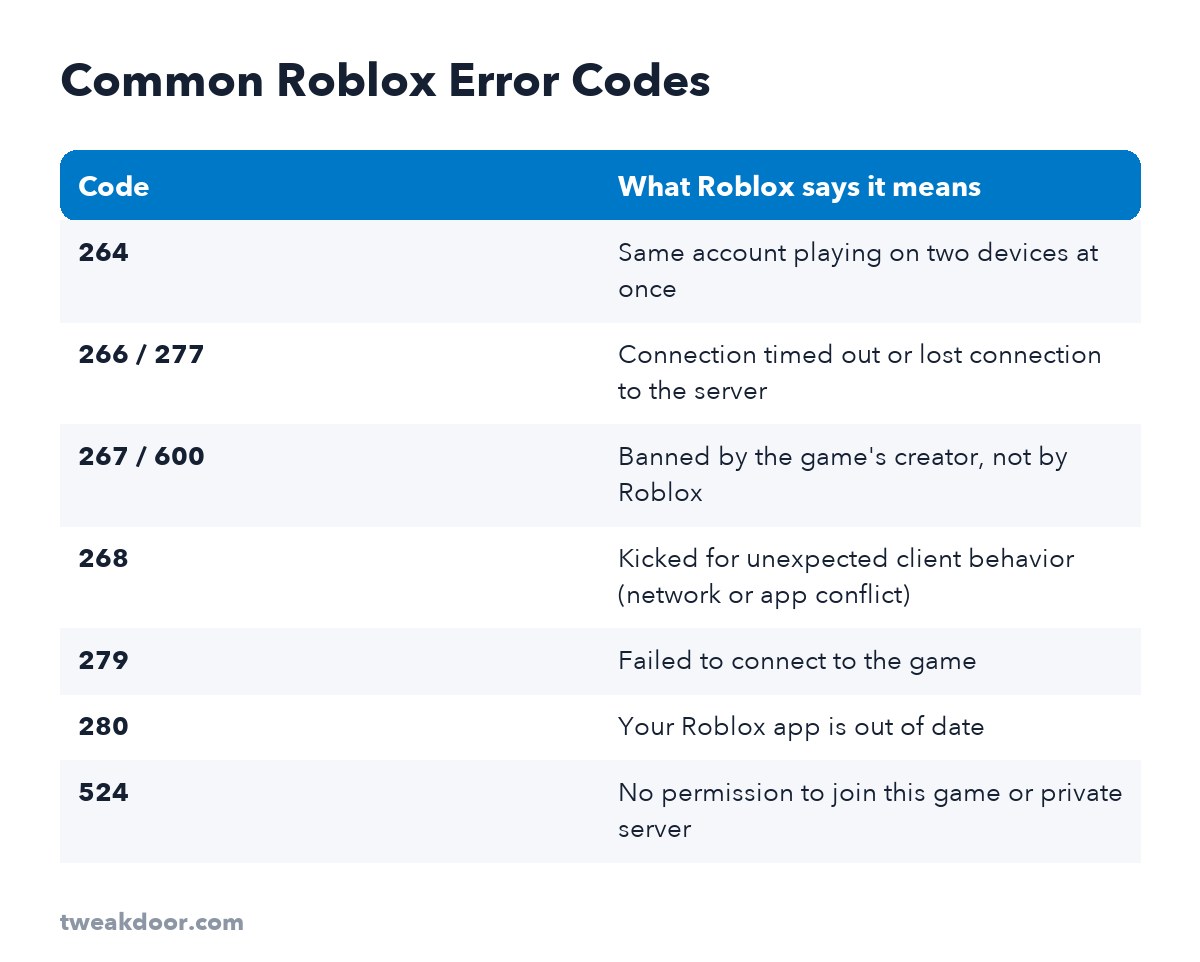
| Error code | What Roblox says it means | What to do |
|---|---|---|
| 264 | Your account joined the same game from more than one device | Log out on the other device |
| 266 | Connection timed out | Check your internet speed |
| 267 / 600 | You were banned by that game’s creator, not by Roblox | Contact the game creator; Roblox support cannot remove it |
| 268 | Kicked for unexpected client behavior | Check your network and apps like antivirus |
| 277 | Lost connection to the game server | Rejoin or restart your connection |
| 279 | Failed to connect to the game | Restart, reinstall, try another network |
| 280 | Your Roblox version may be out of date | Update Roblox |
| 403 | On PC, Roblox did not start properly from the website | Reinstall and relaunch |
| 524 | No permission to join the game or private server | Check privacy and private server settings |
You may see other codes listed on unofficial sites, but these are the ones Roblox explains in its own help center.
Step 3: Fix Roblox on PC and Mac
- Roblox needs 64-bit Windows 10 or 11, or macOS 10.13 or later. Linux is not supported.
- Roblox says a firewall is very often the cause of connection problems. Allow Roblox through your firewall and antivirus.
- Try a wired connection and turn off ad-blocker add-ons in your browser.
- Reinstall Roblox if it still will not open.
- Roblox does not support virtual machines or cloud computers.
Step 4: Fix Roblox on Xbox and PlayStation
Roblox points console players to Microsoft’s and Sony’s own troubleshooting steps for apps that will not start. On Xbox, error 901 usually means a username problem at sign-up or a moderated account linked to your Gamertag. If nothing works, contact Roblox support with your Gamertag or PSN name.
Can’t Chat? Roblox Age Checks Explained
In January 2026, Roblox started requiring a facial age check to use chat, beginning in the US. Players chat with people in their own and nearby age groups, and kids under 9 need parental consent. Roblox also introduced Roblox Kids (ages 5 to 8) and Roblox Select (ages 9 to 15) accounts, available worldwide since June 2026. Without an age check, chat is turned off. If the age check fails, close camera-effect or virtual camera apps and try again, or use ID verification instead.
Parents can manage spending limits, screen time, chat and content in Settings > Parental controls, either by linking their own account or using Parent mode on the child’s device.
Still Not Working?
Contact Roblox support with your username, the error message, your device model and your iOS or Windows version. Once you are back in, grab free rewards from our Roblox codes library, with working codes for 40+ games.
Roblox Not Working: Frequently Asked Questions
How do I know if Roblox is down?
Check status.roblox.com, Roblox’s official status page.
What does Roblox error 267 mean?
You were banned from that experience by its creator. Roblox support cannot remove it, so contact the game’s creator.
Why does Roblox keep disconnecting?
It is usually a weak or blocked connection. Switch to Wi-Fi, restart your router, and check firewall or antivirus settings.
Why can’t I chat on Roblox?
Roblox now requires an age check to use chat. Complete the facial age check or ID verification in your settings.
What iOS version does Roblox need?
Roblox needs iOS 14 or later.